- Powerful uploading capabilities packed in minimal, fluid user interfaces.
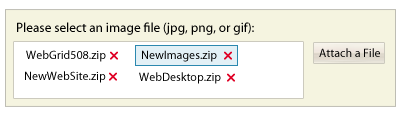
- The attachment layout has only a button to attach a file. When selected, the file will be added to the main fluid container. The container will grow or shrink automatically as you add or remove files.
- To remove a file, simply click on the red X button, or select the file with a mouse click then press Delete button.
- The attachment layout doesn't include the command to perform uploading process. This is by design due to the nature of the user interface. In most cases, you may already have a button to perform data saving, where you can call WebFileUploader's client-side API to programmatically perform file uploading.
 See Also


