


Intersoft WebFileUploader revolutionizes uploading experience with innovative, real-time progress bar feature. With this feature, user can now see the current uploading progress directly within the file upload interface, making file uploading more engaging and intuitive. Furthermore, WebFileUploader also provides more sophisticated progress information such as uploaded size and estimated completion time.
WebFileUploader shows two types of progress bar, for each file upload and for overall upload progress status.
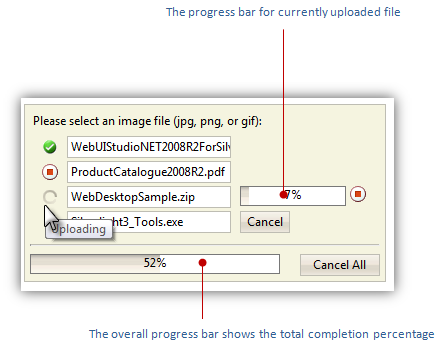
In addition, WebFileUploader provides comprehensive progress bar options enabling you to customize the progress bar behaviors. For instances, you can disable the overall progress bar, or change the progress information type to show uploaded size instead of percent completed.
The following is a list of properties for customizing progress bar:
- ProgressLatency.
This property lets you specify the time latency for progress bar update. Default value is 500 milliseconds.
- ProgressInformationType.
The information type for individual upload progress. Default value is Percentage, while other options are Size and TimeRemaining.
- ProgressInformationTypeForTotal.
Similar to ProgressInformationType, this property is to set the information type for the overall progress bar.
- ShowProgressArea.
Determines whether progress bar area should be shown.
- ShowProgressBar.
Determines whether the progress bar for each upload should be shown.
- ShowProgressBarForTotal.
Determines whether the progress bar for overall upload should be shown.
WebFileUploader also provides comprehensive styles for customizing the appearance of the progress bar. You can customize the progress bar frame, the information text, the status text, the mask style and more.
 |
The progress bar feature requires additional http handler registration on your web.config. Please refer to IIS Support for more details. |
 See Also
Other Resources
{Large files uploading with minimal resources consumption}
{IIS 6 and IIS 7 Integrated mode support}
{Webfarm and multiple worker requests support with built-in FileStateServer}
{Rich user experiences}
{Built-in file saving}
{Upload}
{Client-side events}
{Server-side events}
{Initial files count}
{Limit upload files by type, count, or custom}
{Limit upload size and total upload size}