


To provide a more intuitive editing experience, floating toolbar -- similar to Mini toolbar provided in Microsoft Office Word 2007 -- is natively supported in WebTextEditor. This feature can be enabled by setting ToolBarSettings >> EnableFloatingToolBar property to true.
When enabled, user can select text and floating toolbar will be displayed in half opacity near the latest position of cursor. Floating toolbar helps user work with basic formatting functionalities without have to navigating to the main toolbar area.
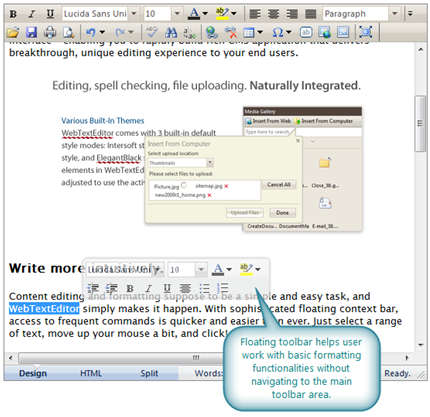
Floating toolbar applies independent styles that do not depend on selected theme. It will gradually fade out when user moves further from it and it will be hidden when user hovers on main toolbar area.
 |
Floating toolbar will be displayed when a text is selected via mouse. It will not be displayed when user selects a text using keyboard navigation. |