


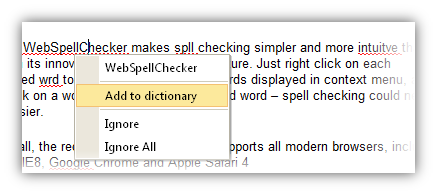
Often times, WebSpellChecker may show specific terms such as scientific or other valid words as misspelled words. This occurred because the specific words don't exist in dictionary. WebSpellChecker makes it possible for users to add such words into dictionary, so that WebSpellChecker will not mark it as misspelled word again in the future. To add word to a dictionary, simply right click on the specific word and choose "Add to dictionary" option in the context menu.
 |
In order to add to dictionary, the dictionary folder's permission should be granted with write access. |
 See Also
Other Resources
{Change}
{Ignore}
{Ignore All}